A practical, step-by-step Meta Ads guide for the Indian market. Set up campaigns, review your ads before publishing, and check your same-day performance.
India MarketAndroid AudienceMeta Ads ManagerSame-day Review
START HERE
How the WinTask Promotion Flow Works
Promote WinTask using the unique ad link assigned by the company. When a user clicks the link, the registration page opens with the assigned referral code pre-filled. Registrations and task conversions are counted based on the WinTask dashboard records.
₹15 / ₹10 / ₹5Registration cost caps
₹35 / ₹25 / ₹15First valid task cost caps
10% / 20% / 30%Performance bonus rates
Campaign flow: Get manager approval → Create campaign → Set up ad set → Upload creative and copy → Add your unique tracking link → Review and publish → Check same-day results in the WinTask dashboard.
PERFORMANCE RULES
Incentive Structure
Tier
Registration Cost Cap
First Valid Task Cost Cap
Bonus Rate
Level 1
₹15
₹35
10%
Level 2
₹10
₹25
20%
Level 3
₹5
₹15
30%
Cost Calculation
Registration Cost = Same-day ad spend ÷ Same-day valid registrations.
First Valid Task Cost = Same-day ad spend ÷ Users who completed their first eligible task and passed WinTask dashboard verification that day.
Both cost targets must be met to qualify for the relevant tier.
Assessment is based on same-day data. No 7-day attribution window is used.
Each user is counted once as a registration. Subsequent logins are not counted again.
If the Level 1 targets are not met, no performance bonus will be paid for that day. A first task counts only after it passes WinTask dashboard verification.
STEP 01
Create a Meta Campaign
Open Ads Manager
Log in to Meta Ads Manager and click + Create.
Select the campaign objective
Choose Traffic, then select the manual Traffic campaign setup option if it appears in your account.
Set up the campaign
Buying type: Auction. Use a clear campaign name, for example WT_INDIA_TEST_DATE_BATCH.
Budget and testing options
For the first test, use Ad Set Budget. Keep A/B Test off unless your manager asks you to run one. Use the highest-volume bid strategy if available.
Meta may show slightly different labels or options depending on your ad account and current rollout.
STEP 02
Set Up the Ad Set
Name the ad set
Suggested format: WT_INDIA_AUDIENCE_BATCH.
Conversion location and performance goal
Select Website. Prefer Maximise landing page views where available. If this option is not available, discuss the link-click option with your manager.
Budget and schedule
Enter the daily budget and dates approved by your manager. Do not increase the budget on your own.
Location and audience
Set the location to India. The initial test can start with ages 18–44 and all genders, subject to the campaign's approved audience and applicable Meta rules.
Device settings
Choose mobile devices and Android where the option is available. Exclude Android tablets only if WinTask does not support them.
Language and targeting
You may test English and Hindi. If language restrictions make the audience too narrow, discuss a separate all-language test. Avoid adding too many interests at once.
Placements
For the initial test, consider Facebook Feed, Instagram Feed, Facebook Stories, Instagram Stories, Facebook Reels and Instagram Reels. Check the creative preview for every selected placement.
STEP 03
Create the Ad
Confirm the ad identity
Select only the official WinTask Facebook Page and an Instagram account authorised for advertising. Do not publish if the identity is incorrect.
Upload the creative
Choose Manual Upload and use one image or one video for the first test. Check image quality, aspect ratio and cropping across placements.
Enter the ad copy
Write clear and accurate primary text and headline. Explain that users need to register and complete eligible tasks. Rewards are subject to the actual task rules.
Add your unique link
Paste the unique ad link provided by the company. Do not replace it with another link.
Test the registration journey
Open the link on a mobile device. Confirm that the registration page loads correctly and the assigned referral code is pre-filled.
Tracking flow: Unique ad link / referral code → WinTask dashboard. Do not treat clicks or landing page views as registrations or task conversions.
ENGLISH ADS MANAGER SCREEN REFERENCES
Meta Ads Manager — English Interface Screenshots
The screenshots below are real English-language interface examples from published advertising guides. They replace the earlier Chinese-language screenshots and mock-up screens. Meta may update its interface, so some labels or layouts may differ from your live account.
1. Choose the Traffic Campaign Objective
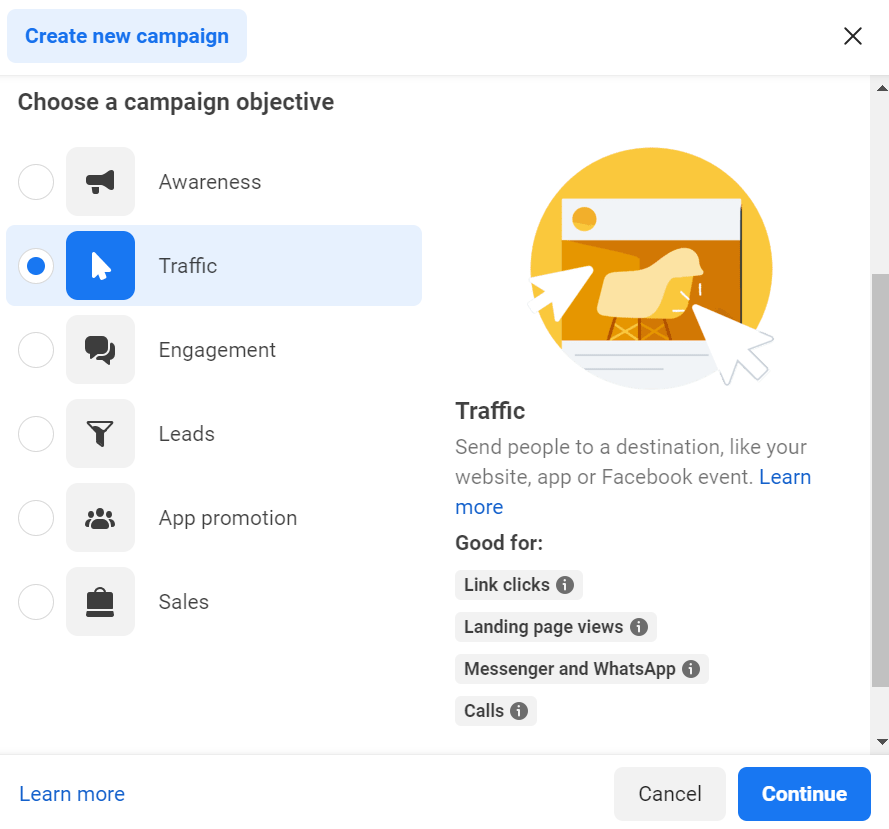
In Ads Manager, click Create. Select Traffic as the campaign objective, then click Continue. This is the English-language objective selection screen.
2. Set the Website Destination and Performance Goal
At the Ad Set level, choose Website as the destination. For a website traffic test, select the available performance goal that matches the approved plan. The exact options depend on the campaign setup shown in your account.
Image source: XYZ Lab — How to Apply Cost Cap in Meta Ads
3. Configure the Audience
Set the location to India. Review age, language and audience controls based on the approved WinTask campaign brief. Avoid narrowing the audience with too many restrictions in the first test.
Image source: ConvertBomb — Facebook Ad Targeting Basics
4. Add the Website URL and Review the Ad
At the Ad level, select the correct authorised Page identity, add the creative and copy, and enter the unique WinTask ad link in Website URL. Test the link and confirm the referral code is pre-filled before publishing.
Image source: Airbridge Help Center — Meta Ads Website Conversion Setup
These are reference screenshots from published guides, not screenshots from your own ad account. Follow the options available in your live Ads Manager account and the approved WinTask campaign settings.
PRE-PUBLISH CHECK
Pre-Publish Checklist
Tick each item before publishing. Your checklist progress is shown below.
0 of 9 completed
After all checks are complete, click Publish in Ads Manager. Meta will review the ad before delivery starts. Clicking Publish does not mean the ad is live immediately.
STEP 04
Publishing & Performance Tracking
Meta Ads Manager: Monitor spend, impressions, clicks and landing page views.
WinTask dashboard: Check same-day valid registrations and first valid task users whose tasks passed verification.
Meta SDK / App Events are not currently connected. Meta data should not be treated as confirmed app registrations or completed tasks.
Each user is counted once as a registration. A first task counts only after dashboard verification.
Daily cost and bonus assessment uses same-day data, not a 7-day attribution window.
Eligible ad spend means actual spend within the budget approved by the manager.
Any extra spend that has not been approved by the manager will not be included in the bonus calculation.
If you need more budget, contact your manager first. The manager will review registrations and task conversions in the dashboard before approving an increase.
30% is the current trial maximum. The company may revise the rate based on business performance and will notify the team before the revised rate takes effect.
Bonus Example
Eligible Ad Spend (Same Day)
Tier
Bonus Rate
Extra Bonus
Ad Spend + Bonus Total
₹10,000
Level 1
10%
₹1,000
₹11,000
₹10,000
Level 2
20%
₹2,000
₹12,000
₹10,000
Level 3
30%
₹3,000
₹13,000
The final column shows ad spend plus bonus as a combined cost figure. The media buyer's performance bonus is shown separately in the Extra Bonus column.
QUICK CALCULATOR
Daily Cost & Bonus Calculator
Enter eligible same-day ad spend, valid registrations and first valid task users verified by WinTask.
Enter your figures and click Calculate Tier.
POLICY & TRUST
Ad Compliance Requirements
Do not make false income claims, guarantee earnings, exaggerate task volumes or use misleading reward statements.
Do not suggest that users get paid simply for receiving SMS messages. Clearly explain the eligible task requirements and verification process.
SMS tasks must be based on legitimate business activity and appropriate user consent, and must comply with applicable Indian laws, telecom operator requirements and platform policies.
Do not hide important conditions, withdrawal limits or reward rules in the ad copy or landing page.
If Meta changes its interface, policy or available settings, follow the latest instructions from the company and the options shown in your live Ads Manager account.